
User manual
Silk manual.
A practical guide to Silk 1.1.0, included in current purchase downloads. Check the plugin Information panel for your installed version.
One-minute setup
Start small, then decide what the track actually needs.
Silk is a finishing enhancer, not a repair chain. It works best when the source already feels close and the remaining job is height, width, and smoothness.
Load Silk on a vocal, instrument, drum bus, or mix bus that already feels close.
Choose a factory preset near the job, or start from Init.
Raise Air Lift until the source opens up, then stop before the lift calls attention to itself.
Use De-Harsh if the added air gets sharp, glassy, or fatiguing.
Add Warmth for lower-mid harmonic body. It needs some Air Lift but works with De-Harsh off.
Use Width on stereo material when the sides need more height or space.
Turn on Auto Gain while judging changes, then set Output manually if the final level matters.
Leave Soft Guard on for normal use.
Install
Use the platform installer from your receipt.
The installers put Silk in the standard system plug-in locations. If your DAW was open during install, restart it before looking for Silk.
macOS
Close your DAW, open the macOS DMG from your Lemon Squeezy receipt, then run the package installer inside it. Allow administrator permission if asked, then restart or rescan your DAW.
- AU: /Library/Audio/Plug-Ins/Components/Silk.component
- VST3: /Library/Audio/Plug-Ins/VST3/Silk.vst3
- Use AU in Logic Pro. Use VST3 in hosts that prefer VST3.
Windows
Close your DAW and run the Windows setup installer from your Lemon Squeezy receipt. Allow administrator permission if Windows asks, then restart or rescan your DAW.
- VST3: %CommonProgramFiles%\VST3\Spectraforge\Silk.vst3
- The normal customer download is the setup executable.
- Raw VST3 zips are backup/manual artifacts, not the recommended install path.
Licence
Lemon key proves purchase. Silk.silk-license unlocks the plugin.
The website validates your Lemon Squeezy key and returns a signed offline file. After import, Silk verifies the file locally.
Use the installer from your purchase download and generate your activation file through the licence page. Keep your working installer and licence backup when updating.
Buy Silk
Lemon Squeezy emails your download link and Lemon Squeezy licence key after checkout.
Generate Silk.silk-license
Open the licence page, paste your Lemon key and purchase email, then download the signed offline file.
Generate licence fileImport inside Silk
Open Silk, choose Import License in the licence overlay, and select Silk.silk-license. Keep the file private and retain your receipt for recovery.
Work offline
Silk validates the signed file locally. You can generate it on an internet-connected device and transfer it privately to an offline DAW computer. A single seat permits up to three owned or controlled computers; separate users need separate seats.
Before updating
Saved settings can produce a different sound in 1.1.0.
Air Lift, De-Harsh and Warmth have changed. Parameter values and preset slots are retained, but there is no legacy-engine switch. Save a project copy and render important processed tracks before replacing an earlier version. Keep the earlier installer and a private backup of its working signed licence file if you need to restore it: a newly generated licence may not unlock older builds.
Close all audio hosts before running an update. Confirm the version in Information, then audition the project copy. The package requirements are macOS 11 or later on Intel or Apple Silicon, or 64-bit Windows 10 or later with an x64 VST3 host. These requirements do not certify every DAW and operating-system combination. There is no AAX or standalone build.
Using an earlier version?
Check Information before following the 1.1 control guidance. In the earlier engine, De-Harsh restrains the added enhancement rather than making the new selective cuts to the combined wet signal.
Earlier Warmth returns energy controlled by De-Harsh, so it needs Air Lift and actual De-Harsh activity. In 1.1, Warmth instead uses lower-mid input and works with De-Harsh off. Earlier Air voicing also varies more across Quality modes.
Versions before 1.0.2 may mute while locked. From 1.0.2, an unavailable licence leaves latency-aligned dry audio passing through. Import a valid signed file to enable processing.
Interface map
Four zones, one finishing job.
The interface is split into comparison, analysis, tone, and utility areas so you can work fast without hunting through nested pages.
Give the plugin keyboard focus. Tab and Shift+Tab move between controls; arrows adjust knobs, Shift gives finer steps, and Home/End select the limits. Enter or Space activates buttons or opens preset/Quality menus. Escape closes a menu or Information. Drag labelled knobs vertically with the mouse; Shift gives finer control and double-click restores the default. The analyzer is a display. Your DAW may reserve some keyboard shortcuts.
Top bar
Preset, A/B, Bypass, Information, and Tooltip Help live along the top interaction rail.
Analyzer
The center display compares raw input with final output, including gain changes and bypass. Left/right spectral power is combined so side-only material remains visible. De-Harsh and Warmth show internal activity, not exact removed audio.
Tone deck
Air Lift, Width, De-Harsh, and Warmth are the main sound-shaping controls.
Footer
Input, Quality, Auto Gain, Mix, Soft Guard, and Output handle gain staging, comparison, and processing safety.
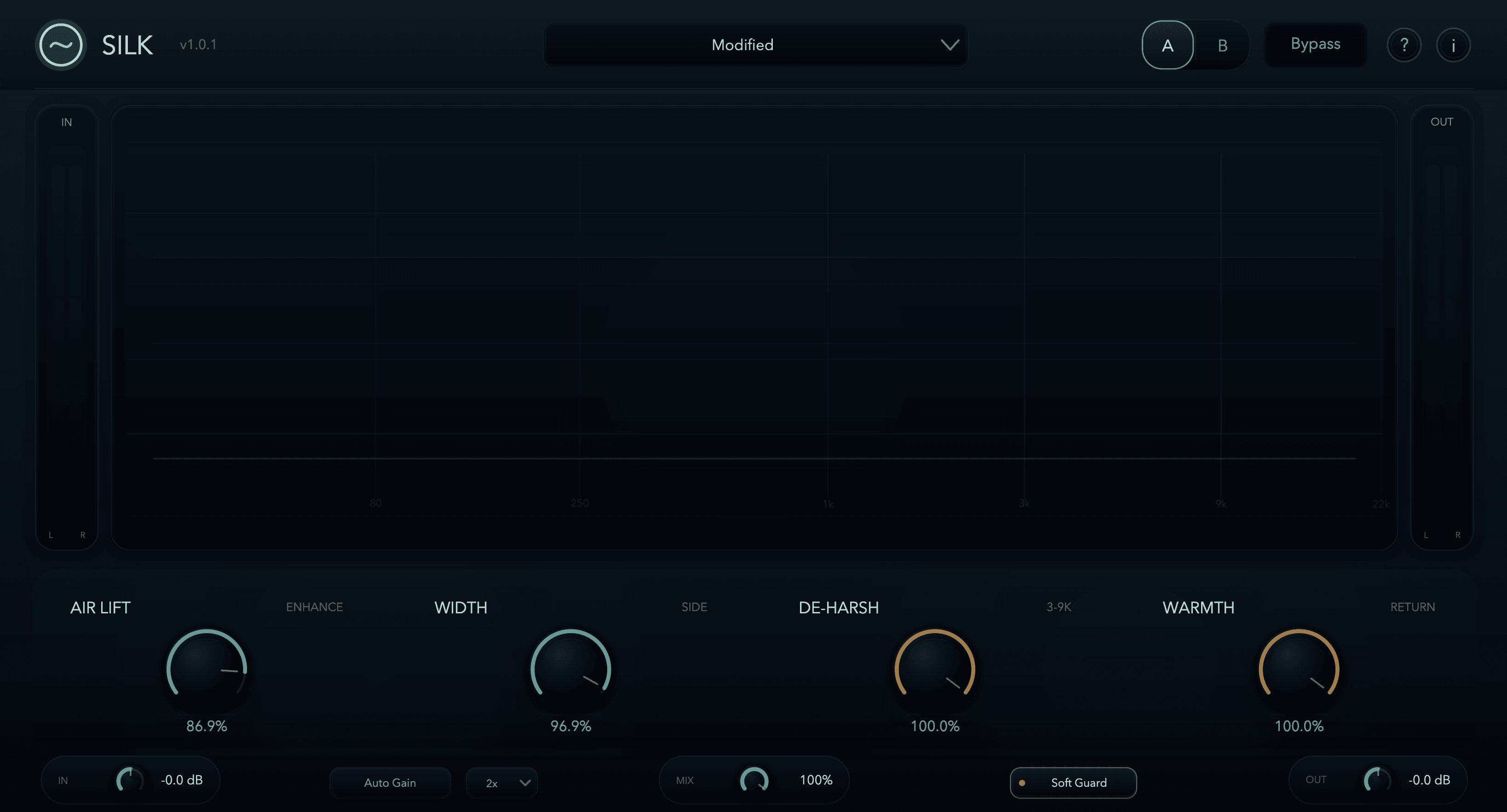
Silk 1.0.1 interface. Control names are retained in 1.1; the updated engine is described below.
Controls
Control defaults and what each section does.
These names match the current Silk interface and host automation labels. Use them when saving notes or contacting support.
Air Lift
Air Lift adds a shaped high-frequency enhancement with separate mid/side voicings. In 1.1.0, its air-band response is calibrated across Quality settings to retain the overall voicing of the earlier 48 kHz/2x mode.
Listen for
- More openness above the presence range.
- Forward detail without simply boosting all treble.
- Brightness that still feels attached to the source.
Use less when
- Cymbals become splashy.
- Vocal esses feel detached.
- The result is impressive for three seconds, then tiring.
Width
Width adjusts the side information already present in stereo material. At 0%, the side image is neutral. Mono sources can still use Air Lift and De-Harsh; Width does not turn them into stereo.
Listen for
- More room around backing vocals, guitars, synths, cymbals, or mix bus air.
- A center image that stays focused while the sides open.
- A wider top end without forcing every track louder.
Use less when
- The vocal, kick, snare, or bass loses center focus.
- Low-level side details become distracting.
- Mono compatibility matters more than stereo size.
De-Harsh
De-Harsh measures added lift in two upper-mid regions, around 3–5.5 kHz and 5.5–9.5 kHz, and makes selective cuts in the combined wet signal. It can reduce original content as well as added enhancement. Depth depends on the source, frequency, Air Lift and De-Harsh; Side processing also follows Width. It does not act at zero Air Lift.
Listen for
- Air Lift staying smooth when pushed harder.
- Vocal presence sitting forward without stabbing.
- Cymbal lift becoming polished instead of glassy.
Use less when
- The source already feels smooth.
- You want the full lift character.
- The result feels too tucked or polite.
Warmth
Warmth generates harmonic body from lower-mid input content, then shapes that return before adding it to the wet signal. It needs some Air Lift but works independently of De-Harsh. It replaces the older return of energy removed by De-Harsh.
Listen for
- Air that does not thin out the vocal or bus.
- Harmonic body in vocals, keys and instruments with lower-mid content.
- More body in bright acoustic instruments or parallel effects.
Use less when
- Upper mids feel cloudy.
- Low-level texture gets dense.
- You want clean, surgical brightness.
Utility controls
Gain, quality, comparison, and guardrails.
These controls decide how hard Silk is driven, how you compare the result, and how much CPU/latency you spend on the final polish.
Input
Input trims the signal before processing. With Auto Gain on, it behaves more like drive into Silk because the output is level-matched for comparison.
Mix
Mix blends dry and Silk inside the processed path. 0% removes the tone processing, 50% is a parallel blend, and 100% is full Silk. Input, Auto Gain and Output can still affect level at Mix 0%; use Bypass for the raw latency-aligned signal.
Output
Output trims the processed path after Mix and Auto Gain. If full Bypass is engaged, the raw bypass path does not use this trim.
Auto Gain
Auto Gain uses perceptual K-weighted measurement to help level-match comparisons. Its recent-peak measurement reduces the target gain, but it is not a limiter and does not guarantee a peak ceiling. Check final headroom in your DAW.
Soft Guard
Soft Guard applies a soft ceiling inside the mid/side processing path, before Mix, Auto Gain and Output. It is not a final limiter: transients and later gain changes can still exceed 0 dBFS.
Quality
Quality selects Off, 2x, or 4x processing. Air Lift is calibrated across modes, but output is not identical and Warmth phase can differ. Off keeps the main path at zero latency while privately oversampling the Warmth return. 2x is the default; 4x uses more CPU and latency. Choose Quality before an offline render so your DAW can update its compensation.
Signal flow
What happens inside Silk.
This is the practical order to understand when dialing settings. It is intentionally simpler than the engineering internals.
Presets
18 factory presets, designed as starting points.
Presets set Air Lift, Width, Warmth, Mix, and De-Harsh. They do not set Input, Output, Quality, Auto Gain, Soft Guard, or Bypass.
Clean starts
Use these when the source already works and you only need a controlled lift.
Init, Master Air, Mix Bus Lift, Center Shine
Vocals
Start here for lead vocals, bright vocals, or layered background vocals.
Vocal Air, Vocal Guard, Vocal Stack
Instruments and drums
Use these for source-specific sheen and controlled edge.
Drum Bus Polish, Cymbal Guard, Acoustic Sheen, Piano Air, Guitar Chime
Stereo and character
Use these when you want a more obvious starting point, then pull Mix back if needed.
Open Sides, Warm Return, Dark Mix Lift, Bright Guard, Parallel Gloss, Soft Air Wash
Loading a preset resets A/B to slot A and seeds both slots from the preset, so you can immediately fork an alternate version.
Workflows
Useful starting recipes.
Treat these as starting points, not rules. The best setting is the quiet one that survives a bypass check after your ears reset.
Vocal polish
Start with Vocal Air or Vocal Guard. Raise Air Lift until the vocal opens, then raise De-Harsh if esses or presence become sharp. Add a little Warmth if the vocal thins out.
Mix bus air
Start with Master Air or Mix Bus Lift. Keep Air Lift modest, use Width sparingly, leave Soft Guard on, and use 2x or 4x Quality for final decisions.
Bright source control
Start with Cymbal Guard or Bright Guard. Use modest Air Lift, then increase De-Harsh if the lift becomes sharp. De-Harsh does not act at zero Air Lift. Try Warmth when the source has lower-mid body, and compare at matched level.
Stereo opening
Start with Open Sides. Adjust Width first, then add Air Lift if the sides need extra light. Check mono compatibility when the part matters in the center of the mix.
Troubleshooting
Common fixes before emailing support.
Most Silk issues are licence state, DAW scanning, gain staging, or pushing a control further than the source wants.
I hear no audio.
Check host routing, mute/solo and the audio device. Silk 1.1.0 passes latency-aligned dry audio when its licence is unavailable; the overlay explains why processing is locked. Import a valid file to unlock. Versions before 1.0.2 may mute while locked.
Warmth needs Air Lift and lower-mid content.
Use some Air Lift and try vocals, keys or an instrument with body. De-Harsh can remain off. High-frequency percussion alone may produce little Warmth.
I lost my activation file or it will not import.
Generate a replacement using the original purchase email and Lemon Squeezy key on the licence page. The key itself is not the file to import. If saving fails, check disk space and access to your user application-data folder. A failed replacement preserves a working licence. Contact support with your version, order ID and exact error if recovery fails; do not buy again to recover a purchase.
The source gets too sharp.
Reduce Air Lift, raise De-Harsh, lower Mix, or try a Guard preset as the starting point.
The stereo image feels too wide or unfocused.
Lower Width. If the center still feels light, reduce Mix or use a preset with less side emphasis.
Peaks are getting hot.
Leave Soft Guard on, lower Input or Output, reduce Width, or lower Mix. Soft Guard helps, but it is not a final limiter.
Quality changes feel delayed.
Quality changes can require latency and filter-state updates. Silk fades through the transition to avoid clicks.
Support
Send a tight report and we can move faster.
Email info@spectraforgeaudio.com with the details below. For audio-quality issues, a short 10-30 second rendered example is often more useful than a long description.
Glossary
Plain-English terms.
A few terms you may see in Silk, support replies, or host automation lists.
Air-band
The upper high-frequency region where brightness, openness, and sheen are perceived.
De-Harsh
Two-band selective control of the wet signal, triggered by added Air Lift energy.
K-weighted
A loudness measurement shape that better reflects perceived loudness than flat RMS for bright material.
Mid/side
A stereo representation where mid is center information and side is the difference between left and right.
Oversampling
Running internal processing at a higher sample rate to reduce unwanted artifacts from nonlinear processing.
Soft ceiling
A gentle saturation-style level catch, not a hard limiter.
Warmth return
Harmonic body generated from lower-mid input, following Air Lift and independently of De-Harsh.
Next step
Need the licence file?
Generate the offline file from your Lemon Squeezy key, then import it inside Silk.